


NEW RELEASE!
RaimaDB 16.0 Tomorrow’s embedded database
Fast and flexible in-memory database — so you can keep product development moving at top speed with a full suite of features.
Industries
Your data, your way

Energy
- Maintaining parameters, configurations, recipes for manufacturing processes
- Logging events, errors, alarms from systems and processes
- Live data capture

Aerospace & Defense
- Flight reconnaissance systems
- Tactical information
- Mission planning
- Live situational analysis
- Live data capture

Automotive
- Live data capture
- Location data
- Condition monitoring
- Infotainment
- POI
- Repair estimation


Industrial Automation
- Display customization
- Condition monitoring & predictive maintenance
- System optimization
- Supplier Relationship Management & Supply Chain Performance
Why Raima

Move & use data faster
Manage your data with near-zero latency. If your data moves faster, your whole application runs faster. Enable real-time decision-making with the fastest database engine for mission-critical applications.

Trust your database
Unrivaled stability & industry standard roll-back recovery — make decisions faster at the source, ensuring your data is always available, and never lose connection again.

Never manage your data alone

Get started in minutes
RaimaDB APIs
Simple, easy to use, and quick to implement. See for yourself.
Highlights

Small Footprint
RaimaDB needs only 350k of RAM and minimal CPU speeds to fully operate. With more power in the system, RaimaDB will fully utilize it all to perform even faster but that is not required.

Compact data storage
Automatic encoding and compression use 25% less disk space on average. You can also leverage our vacuuming.

Fast in-memory performance
Optimized in-memory implementation allows for faster transactions and results to support enterprises that need the utmost speed and performance.
Benefits
Benefits
Manage your data instantly with zero latency
Benefits
Unrivaled stability & industry standard roll-back recovery
Benefits
Make maintenance easy
Benefits
Simplify your development
Highlights

Embedded / Real-time database
Fully supports real-time system performance. RaimaDB has been designed to meet the zero-administration requirements of an embedded application.

Secure and reliable
AES encryption from 128-bit to 256-bit meets market demand for cybersecurity support and gives Raima clients peace of mind.

Edge-to-Cloud replication
Through the use of SymmetricDS, Raima can store data on the edge and easily replicate that data to RDM or any cloud database.
Features
Tomorrow’s embedded data management solution
Functions
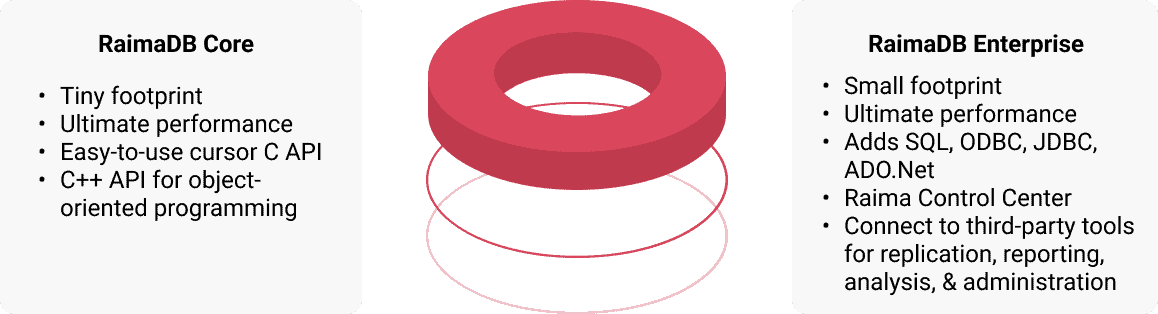
RaimaDB Core
RaimaDB Enterprise
AES Encryption 128,192, 256 bits
Time Series
Multiuser
ACID Compliance
Embedded / Real-time Application
Client/Server
Administrative Utilities
Platform Independence
Developer Environment Integration
Automatic Compression
Disk Storage
In-Memory Storage
Support for Dynamic Schema Modifications
Referential Integrity
Snapshots/Multiversion Concurrency Control(MVCC)
Unicode
AVL, B-Tree, Hash, R-Tree Indexes
Geospatial Datatypes
Vacuuming
Raima High-Speed Replication
Raima Control Center
3rd Party Replication
3rd Party Utilities
Interfaces & Programming Languages
RaimaDB Core
RaimaDB Enterprise
Dynamic DDL
d_navigational API
Modern Cursor API
C/C++
CSV
XML
SQL Standard
SQL Arrays
SQL Unions
SQL Inner and Outer Joins
SQL Scrollable Cursors
SQL Triggers
SQL PL
SQL Stored Procedures
ODBC 3.9
Java JDBC 4.2
RESTful API
Platforms/Operating Systems
RaimaDB Core
RaimaDB Enterprise
Windows
Linux
MacOS
Android
iOS
Solaris
WindRiver VxWorks
WindRiver VxWorks RTP
WindRiver Linux
Green Hills Integrity
Embedded Linux
QNX Neutrino
FreeRTOS
NO OS (bare-bones)
Database Specifications
RaimaDB Core
RaimaDB Enterprise
Maximum Databases Open Simultaneously
No Limit
No Limit
Maximum Rows Per Database
No Limit
Limited only by file system
Maximum Size of Database File
Limited only by file system
No Limit
Maximum Records Per Table
No Limit
No Limit
Maximum Keys Per Database
No Limit
No Limit
Maximum Fields Per Table
No Limit
No Limit
Maximum Row Size
64K (excluding BLOB or VARCHAR)
64K (excluding BLOB or VARCHAR)
RAM Requirements
Minimum 200K, User configurable
Minimum 350K, User configurable
Pricing
Flexible Options. Source or Object code. Startup to Enterprise.
Raima has always made the RaimaDB source code available at a reasonable cost. Raima and its experienced developers are proud of this code and don’t mind if you take a peek, or even step through it in your own debugging system. Source code comes complete with project files necessary for you to build it yourself.
Since RaimaDB can be freely downloaded and licensed for application development at a very low entry fee until it is ready to deploy, and with source code availability, there is very little cost difference between Raima’s commercial licensing and Open Source with support or for commercial use.
Interface
Work easily with Raima admin interface
Use the Visual Tools you’re familiar with through our extensive API support. View and edit your data, insert mock-data, edit and build SQL queries on a simple, user-focused interface.
- View memory usage
- View disk usage
- View active users
- View and edit database contents
- View configuration options
- Multiple data views to fit the variety of users’ needs, for example display of image contents (gif, png, jpeg, bmp) as images
- Editing of data inline and in a dedicated space
- Convenient navigation among data
- Custom filters for table contents or query results, including filters based on cell values
- Results ordering by column
- Data export with all applied filters and orderings
- Generation of SQL statements based on selected rows
- Basic statistics for selected columns
- You may construct complex SQL queries without actual knowledge of SQL
- Make table joins/filtering/ordering visually
- Open existing SQL queries in visual mode to easily edit and save them
- Execute your visually constructed query at any moment and get results on the screen
- Analyze complex SQL queries visually
- Execute your visually constructed query at any moment and get results on the screen
- Analyze complex SQL queries visually
- Tableau harnesses people’s natural ability to spot visual patterns quickly, revealing everyday opportunities and eureka moments alike.
- Live visual analytics fuel unlimited data exploration.
- Interactive dashboards help you uncover hidden insights on the fly.
- Leave chart builders behind
Highlights

Dedicated support team
Our Customer Support team is dedicated to providing fast, friendly and effective service. We also provide free support during your evaluation process to help you get the most out of RaimaDB.

Time series with FFT
Custom generated time series support. Users can specify time series data with full transactional support and downsampling of data. Also FFT support for data transformations.

Platform compatibility
Develop once, deploy anywhere. The file format allows direct copy/paste or movement from one device or platform onto another regardless of byte order or architecture differences. RaimaDB can even run without an OS in a barebones configuration. Learn more.

ACID compliance
ACID transactions guarantee that when changes to a database record are made, that data is correct and no data is lost. Learn more.

Multiple indexing methods
B-Tree, Hash, R-/R+ Tree, and AVL indexes are fully supported by RaimaDB and available for users. Indexing with RaimaDB.

Fast in-memory performance
Full featured and enhanced SQL support including SQL PL, Stored Procedures and Triggers. Learn more.
Get started with RaimaDB today
Easily migrate to RaimaDB today with our detailed documentation and expert support.
